
EVERYTHING IS FREE 4u

Press Ctrl+D To Bookmark Us/Save us To Access in Future Time.

ANDROID GAMES AND APPS

DOWNLOAD HD ANDROID GAMES AND APPS "BIG CONTAIN".

SONGS MP3 AND VIDEO

DOWNLOAD MP3 SONGS AND VIDEO SONGS - BOLLYWOOD AND POP "BIG CONTAIN".

PC APPS

DOWNLOAD PC SOFTWARE "BIG CONTAIN".

PC GAMES

DOWNLOAD BEST PC GAMES "BIG GAMES CONTAIN".

Showing posts with label ANDROID USE FULL APPS. Show all posts

Saturday, 2 March 2013

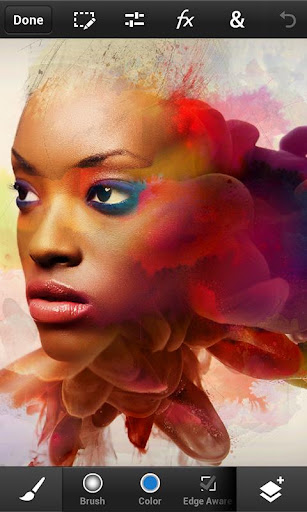
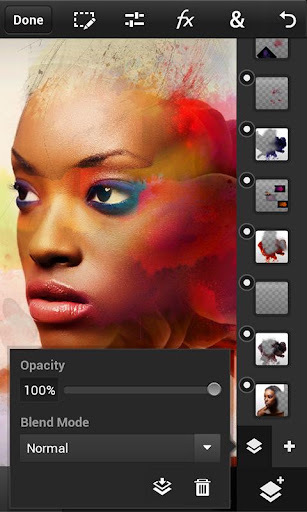
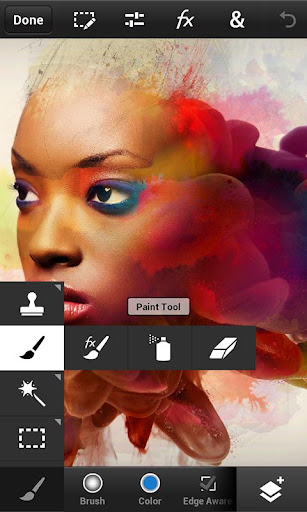
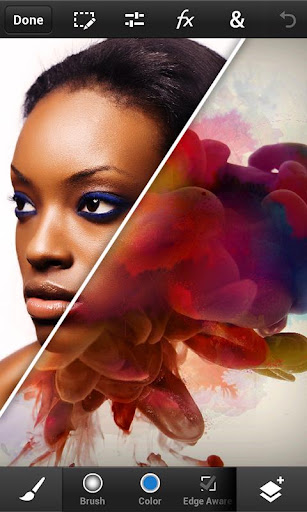
Photoshop Touch for phone v1.0.0 APK 20MB


ring the fun and creative possibilities of Adobe® Photoshop® software to your phone with Adobe Photoshop Touch for phone!


Photoshop Touch for phone play.google.com.pstouchphone
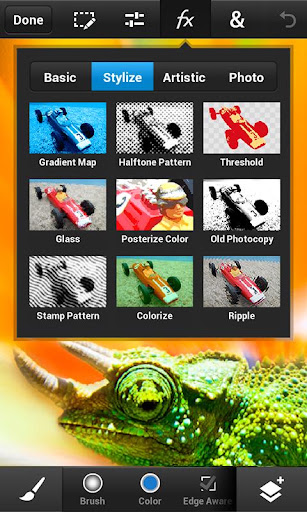
Transform your images with core Photoshop features. Combine images, apply professional effects, and share results with friends and family through Facebook and Twitter — all from the convenience of your phone. Enjoy most of the same features as the tablet version:

Features:
  • Use popular Photoshop features, such as layers, selection tools, adjustments, and filters, to create mind-blowing images. 
  • Improve your photos using classic Photoshop features to bring out the best in your photography. Apply precise tone and color adjustments to your entire composition, a particular layer, or a select area.
  • Create something other-worldly using painting effects, filter brushes, and so much more. With Photoshop Touch, the creative possibilities are endless. 
  • Make your images pop with graphical text. Apply strokes, add drop shadows and fades, and more.
  • Take advantage of your device’s camera to fill an area on a layer with the unique Camera Fill feature. 
  • Quickly combine images together. Select part of an image to extract just by scribbling with the Scribble Selection tool. With the Refine Edge feature, use your fingertip to easily capture hard-to-select image elements, like hair. 
  • Start a project on your phone and finish it on your tablet* or back in Photoshop** at your desk using a free membership to Adobe Creative Cloud™.*** Your projects are automatically synced between your devices. 
  • Free membership to Creative Cloud provides 2GB of cloud storage.
  • Work on high-resolution images while maintaining the highest image quality. Images up to 12 megapixels are supported.
Requires separate purchase of Photoshop Touch for tablet.
  • Adobe Photoshop CS5.1 or later. 
  • Internet connection and complimentary level of membership to Adobe Creative Cloud is required for use of this feature. Creative Cloud membership is only available to users 13 and older and requires agreement to additional terms and Adobe's online privacy policy at http://www.adobe.com/go/privacy_policy_touchapps.
Creative Cloud may not be available in all countries or languages and may be subject to change or discontinuation without notice.

Required Android O/S : 4.0+

Screenshots :


Download : 20Mb APK - Link 1

Sidebar Pro v3.0.0.0 APK 280KB


It's fast, functional, fluid, and customizable to your liking!


Sidebar Pro play.google.com.sidebar
Populate the sidebar with your favorite apps, and simply swipe in from the edge of the screen to gain instant access to the apps you use most. Simple - yet elegant.
  • Fast, fluid, and immersive animations are integrated within Sidebar that keep it as quick as possible, yet help to add a dash of elegance to its presence.
  • A simple Add button appended at the end of the sidebar summons a menu listing all the apps installed on your system. Simply pick an app, and it will be added to the sidebar for quick access.
  • To dock the sidebar, simply select an app or touch outside
  • To remove an app, simply swipe it out of the sidebar! Alternatively, long pressing will bring up further options such as inserting and replacing.
Customization:
  • Starting on boot
  • Adjusting the width & opacity of the bar
  • Adjusting the color scheme & position
  • Enabling/Disabling animations
  • Adjusting the swipe sensitivity
  • Enabling/Disabling vibration
Sidebar Pro
Sidebar Pro lifts the limitations put on the lite version and opens access to new customizability as well as functionality - elevating sidebar, to its most impeccable and pure state.

What's in this version : (Updated : Mar 2, 2013)
  • Bug fixes
  • Removed icon holders, added lock option and animation speed slider
  • Added recent apps widget
  • Revamped settings internally
  • Notification icon toggle (in settings)
  • Swipe Edge positioning and height changing!!!
  • Drop shadow added.
  • Speed improvements have been made.
  • Widgets have been added and are working! Wifi-Bluetooth-Brightness-GPS-autorotate-Torch!
  • Support for devices with no flash
  • Sound widget
Required Android O/S : 2.1+
Screenshots :


Download : 280Kb APK - Link 1

Saturday, 23 February 2013

Sidebar Pro v2.5.2 APK 200KB


It's fast, functional, fluid, and customizable to your liking!


Sidebar Pro play.google.com.sidebar
Populate the sidebar with your favorite apps, and simply swipe in from the edge of the screen to gain instant access to the apps you use most. Simple - yet elegant.

  • Fast, fluid, and immersive animations are integrated within Sidebar that keep it as quick as possible, yet help to add a dash of elegance to its presence.
  • A simple Add button appended at the end of the sidebar summons a menu listing all the apps installed on your system. Simply pick an app, and it will be added to the sidebar for quick access.
  • To dock the sidebar, simply select an app or touch outside
  • To remove an app, simply swipe it out of the sidebar! Alternatively, long pressing will bring up further optionssuch as inserting and replacing.
Customization:
  • Starting on boot
  • Adjusting the width & opacity of the bar
  • Adjusting the color scheme & position
  • Enabling/Disabling animations
  • Adjusting the swipe sensitivity
  • Enabling/Disabling vibration
Sidebar Pro
Sidebar Pro lifts the limitations put on the lite version and opens access to new customizability as well as functionality - elevating sidebar, to its most impeccable and pure state.

What's in this version : (Updated : Feb 23, 2013)
  • Revamped settings internally
  • Notification icon toggle (in settings)
  • Swipe Edge positioning and height changing!!!
  • Drop shadow added.
  • Speed improvements have been made.
  • Widgets have been added and are working! Wifi-Bluetooth-Brightness-GPS-autorotate-Torch!
  • Support for devices with no flash
  • Sound widget
Required Android O/S : 2.1+

Screenshots :


Download : 280Kb APK - LINK 1

Thursday, 21 February 2013

OfficeSuite Pro 7 (PDF & HD) v7.0.1174 APK 19MB


The world’s number one mobile office today!


OfficeSuite Pro 7 (PDF & HD) play.google.com.office_registered
Made by MobiSystems, OfficeSuite Pro allows you to view, create, edit, print and share Word, Excel and PowerPoint files on the go. You can also open attachments and see PDF files on an Android based phone or tablet with our feature-rich mobile office solution.

OfficeSuite Pro includes a File Browser and integration with Cloud service leaders: Box, DropBox, Google Drive, SkyDrive and SugarSync to give users a multitude of options on how to manage files and attachments.
OfficeSuite Pro 7 Out Now! New Features:
  • New and improved UI
  • Side bar navigation in the File Browser for quick access to different folders and remote third party cloud services
  • Templates - OfficeSuite Pro 7 users can benefit from a wide range of templates, from Resume and Invoice templates to Travel Planner and Weight Loss Tracker templates, among others
  • Extended Cloud support - now compatible with Microsoft SkyDrive. Google Drive support has been improved, by adding folder support, thus allowing for optimized document view
Docs Editor:
  • Styles - apply MS Word styles or styles used in the document
  • Table design – ability to fashion an inserted table as per our library of tailor-made designs
  • Formulas (display only)
  • Format painter
Spreadsheet Editor:
  • Improved selection of parameters in functions
  • Slides Editor:
  • Animations
PDF Viewing:
  • A new PDF engine using library from Adobe, providing instant opening of large PDF files
  •  Find/Find Next
File Formats Supported:
  • Text format - DOC, DOCX, DOCM, RTF, TXT, LOG
  • Spreadsheet - XLS, XLSX, XLSM, CSV
  • Presentation - PPT, PPTX, PPS, PPSX, PPTM, PPSM
  • Other formats - PDF, EML, ZIP
Easy File Access and Sharing:
  • With the integrated File Browser you can easily access, modify and share your local or Cloud stored files. OfficeSuite integrates with Google Drive, DropBox, Box, SugarSync and SkyDrive
  • Easily open email attachments
  • Work with Outlook EML files
  • Share documents via Email or Bluetooth
Intuitive and Intelligent Design:
  • OfficeSuite 7 comes with new intuitive design and user experience allowing quick and intuitive workflow while you manage your files or create and modify documents.
  • New side bar gives instant access to local and cloud stored files.
  • Two-finger zoom, multi-touch support, context toolbars and popup menus make your work with OfficeSuite quick and fun.
OfficeSuite Extensions:
  • QuickSpell – fully integrated with OfficeSuite Pro QuickSpell will help you dramatically improve your typing accuracy.
  • Font Pack – allows you to use Microsoft most used fonts in OfficeSuite text documents.
  • Note that OfficeSuite Extensions are sold separately. Purchasing any of the extensions is optional.
Compatible with Sony Ericsson LiveDock™ Multimedia station.

What's in this version : (Updated : Feb 15, 2013)
  • Improved switching between different keyboards
  • New version 7
  • New and improved UI
  • Sidebar navigation in File Browser
  • Templates
  • Extended Cloud support - now compatible with Microsoft SkyDrive. Google Drive support has been improved, by adding folder support
  • Styles in text documents
  • Table designs
  • Formulas (display only)
  • Improved selection of parameters in functions
  • Animations
  • A new PDF engine using library from Adobe
Required Android O/S : 1.6+

Screenshots :


Download : 19Mb APK - Link 1

SwiftKey Keyboard v4.0.0.106 APK 6MB


Meet the world’s smartest touchscreen keyboard for Android!


SwiftKey 3 Keyboard play.google.com.swiftkey
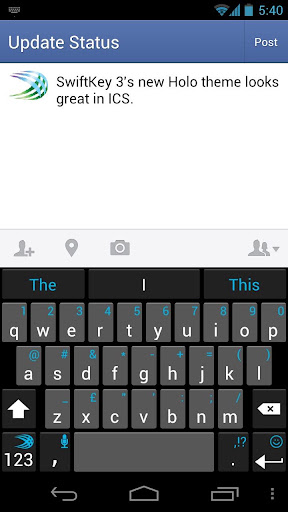
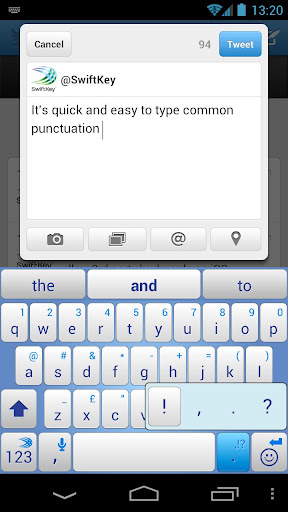
SwiftKey 3 understands how words work together, giving much more accurate corrections and predictions than other keyboards. Very sloppy typing will magically make sense, even if you miss spaces, and SwiftKey 3 also predicts your next words.

SwiftKey 3 learns the words and phrases you use, and how you interact with your keyboard as you use it, to make typing easier and even more accurate over time. You can also personalize it using your Gmail, Facebook, Twitter or blog posts.

SwiftKey is among Android's best selling apps for a reason -- it transforms your keyboard, making typing a breeze and saving you hassle every day.

LANGUAGES SUPPORTED: (enable up to three at once if you're multi-lingual)
  • English (US)
  • English (UK)
  • Afrikaans
  • Arabic
  • Basque
  • Bulgarian
  • Catalan
  • Croatian
  • Czech
  • Danish
  • Dutch
  • Estonian
  • French (CA)
  • French (FR)
  • Finnish
  • Galician
  • German
  • Greek
  • Hebrew
  • Hungarian
  • Icelandic
  • Indonesian
  • Italian
  • Kazakh
  • Korean
  • Latvian
  • Lithuanian
  • Norwegian
  • Persian (Farsi)
  • Polish
  • Portuguese (BR)
  • Portuguese (PT)
  • Romanian
  • Russian
  • Serbian
  • Spanish (ES)
  • Spanish (US)
  • Slovak
  • Slovenian
  • Swedish
  • Turkish
  • Ukrainian
Support for QWERTY, QWERTZ, QZERTY, AZERTY, DVORAK, COLEMAK, Arabic, Bulgarian, Greek, Hebrew, Korean, Persian (Farsi), Russian and Ukrainian layouts.

What's in this version : (Updated : Feb 20, 2013)
  • SwiftKey Flow: World’s most accurate gesture input, with next word prediction
  • Flow Through Space: Gesture multiple words without lifting a finger
  • Personalization: More thorough learning of your language and typing style
  • Better predictions: Enhanced language engine, predictions in more text fields
  • Easier corrections: Tap anywhere on a word to choose an alternative
  • 60 languages: Now including Albanian, Bosnian, Javanese, Sundanese, Thai, Vietnamese
Required Android O/S : 2.1+

Screenshots :


Download : 6.5Mb APK - Link 1

Friday, 15 February 2013

OfficeSuite Pro 7 (PDF & HD) v7.0.1166 APK 13MB


The world’s number one mobile office today!


OfficeSuite Pro 7 (PDF & HD) play.google.com.office_registered
Made by MobiSystems, OfficeSuite Pro allows you to view, create, edit, print and share Word, Excel and PowerPoint files on the go. You can also open attachments and see PDF files on an Android based phone or tablet with our feature-rich mobile office solution.

OfficeSuite Pro includes a File Browser and integration with Cloud service leaders: Box, DropBox, Google Drive, SkyDrive and SugarSync to give users a multitude of options on how to manage files and attachments.

OfficeSuite Pro 7 Out Now! New Features:
  • New and improved UI
  • Side bar navigation in the File Browser for quick access to different folders and remote third party cloud services
  • Templates - OfficeSuite Pro 7 users can benefit from a wide range of templates, from Resume and Invoice templates to Travel Planner and Weight Loss Tracker templates, among others
  • Extended Cloud support - now compatible with Microsoft SkyDrive. Google Drive support has been improved, by adding folder support, thus allowing for optimized document view
Docs Editor:
  • Styles - apply MS Word styles or styles used in the document
  • Table design – ability to fashion an inserted table as per our library of tailor-made designs
  • Formulas (display only)
  • Format painter
Spreadsheet Editor:
  • Improved selection of parameters in functions
  • Slides Editor:
  • Animations
PDF Viewing:
  • A new PDF engine using library from Adobe, providing instant opening of large PDF files
  •  Find/Find Next
File Formats Supported:
  • Text format - DOC, DOCX, DOCM, RTF, TXT, LOG
  • Spreadsheet - XLS, XLSX, XLSM, CSV
  • Presentation - PPT, PPTX, PPS, PPSX, PPTM, PPSM
  • Other formats - PDF, EML, ZIP
Easy File Access and Sharing:
  • With the integrated File Browser you can easily access, modify and share your local or Cloud stored files. OfficeSuite integrates with Google Drive, DropBox, Box, SugarSync and SkyDrive
  • Easily open email attachments
  • Work with Outlook EML files
  • Share documents via Email or Bluetooth
Intuitive and Intelligent Design:
  • OfficeSuite 7 comes with new intuitive design and user experience allowing quick and intuitive workflow while you manage your files or create and modify documents.
  • New side bar gives instant access to local and cloud stored files.
  • Two-finger zoom, multi-touch support, context toolbars and popup menus make your work with OfficeSuite quick and fun.
OfficeSuite Extensions:
  • QuickSpell – fully integrated with OfficeSuite Pro QuickSpell will help you dramatically improve your typing accuracy.
  • Font Pack – allows you to use Microsoft most used fonts in OfficeSuite text documents.
  • Note that OfficeSuite Extensions are sold separately. Purchasing any of the extensions is optional.
Compatible with Sony Ericsson LiveDock™ Multimedia station.

What's in this version : (Updated : Feb 15, 2013)
  • New and improved UI
  • Sidebar navigation in File Browser
  • Templates
  • Extended Cloud support - now compatible with Microsoft SkyDrive. Google Drive support has been improved, by adding folder support, thus allowing for optimized document view
  • Styles in text documents
  • Table designs
  • Formulas (display only)
  • Format painter
  • Improved selection of parameters in functions
  • Animations
  • A new PDF engine using library from Adobe
  • Find/Find Next in PDF
Required Android O/S : 1.6+

Screenshots :


Download : 13Mb APK - Link 1