
EVERYTHING IS FREE 4u

Press Ctrl+D To Bookmark Us/Save us To Access in Future Time.

ANDROID GAMES AND APPS

DOWNLOAD HD ANDROID GAMES AND APPS "BIG CONTAIN".

SONGS MP3 AND VIDEO

DOWNLOAD MP3 SONGS AND VIDEO SONGS - BOLLYWOOD AND POP "BIG CONTAIN".

PC APPS

DOWNLOAD PC SOFTWARE "BIG CONTAIN".

PC GAMES

DOWNLOAD BEST PC GAMES "BIG GAMES CONTAIN".

Showing posts with label Android Personalisation. Show all posts

Saturday, 2 March 2013

Sidebar Pro v3.0.0.0 APK 280KB


It's fast, functional, fluid, and customizable to your liking!


Sidebar Pro play.google.com.sidebar
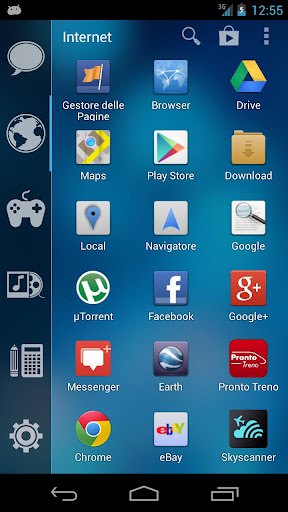
Populate the sidebar with your favorite apps, and simply swipe in from the edge of the screen to gain instant access to the apps you use most. Simple - yet elegant.
  • Fast, fluid, and immersive animations are integrated within Sidebar that keep it as quick as possible, yet help to add a dash of elegance to its presence.
  • A simple Add button appended at the end of the sidebar summons a menu listing all the apps installed on your system. Simply pick an app, and it will be added to the sidebar for quick access.
  • To dock the sidebar, simply select an app or touch outside
  • To remove an app, simply swipe it out of the sidebar! Alternatively, long pressing will bring up further options such as inserting and replacing.
Customization:
  • Starting on boot
  • Adjusting the width & opacity of the bar
  • Adjusting the color scheme & position
  • Enabling/Disabling animations
  • Adjusting the swipe sensitivity
  • Enabling/Disabling vibration
Sidebar Pro
Sidebar Pro lifts the limitations put on the lite version and opens access to new customizability as well as functionality - elevating sidebar, to its most impeccable and pure state.

What's in this version : (Updated : Mar 2, 2013)
  • Bug fixes
  • Removed icon holders, added lock option and animation speed slider
  • Added recent apps widget
  • Revamped settings internally
  • Notification icon toggle (in settings)
  • Swipe Edge positioning and height changing!!!
  • Drop shadow added.
  • Speed improvements have been made.
  • Widgets have been added and are working! Wifi-Bluetooth-Brightness-GPS-autorotate-Torch!
  • Support for devices with no flash
  • Sound widget
Required Android O/S : 2.1+

Screenshots :


Download : 280Kb APK - Link 1

Saturday, 23 February 2013

Smart Launcher Pro v1.2.21.a APK 1.6MB


Simple, Light, Fast!


Smart Launcher Pro play.google.com.flowerpro
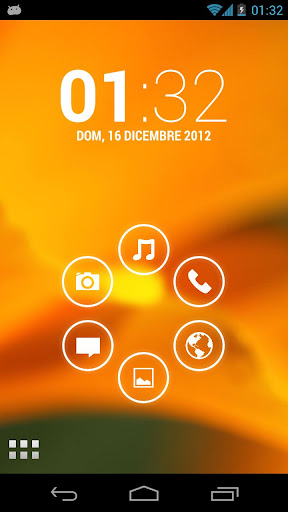
Smart Launcher is an innovative launcher characterized by a minimalist design, low memory usage and an user-friendly UI that let you start any application with a few taps.
It is currently the only launcher on the store to features automatic cataloging of installed apps!

Features:

  • Main screen with Quick Start
  • Drawer organized by categories
  • Ready to use without special configurations.
  • Support for Live Wallpaper and screens of different sizes.
  • Support of set of icons for Launcher Pro and ADW Launcher
What's in this version : (Updated : Feb 21, 2013)
  • bugfix and optimization;
  • possibility to choose a custom intent to start when you click the clock.
  • possibility to select original theme for the icons in the bubbles.
Required Android O/S : 2.1+

Screenshots :


Download : 1.6Mb APK - Link 1

Action Launcher Pro v1.3.0 APK 2.7MB


Getting you where you need to go, faster!


Action Launcher Pro play.google.com.actionlauncher.pro
Action Launcher re-imagines the concept of an Android launcher. Put simply, Action Launcher is designed to get you where you need to go, faster.

It looks and feels like a natural launching pad for the Android ecosystem.

Features:

  • Sliding app drawer for instant access to all your apps
  • 'Covers', a powerful new way to quickly launch apps and shortcuts without compromising the look of your carefully crafted homescreen. 
  • Action bar present on the home screen
  • Highly organized customization options
  • Strong Play Store integration
Action Launcher automatically imports your existing launcher layout, so you'll instantly feel right at home.

What's in this version: (Updated : Feb 22, 2013)
  • NEW: Quicksearch list doubles as a recent apps list
  • NEW: Google Now shortcuts from quicksearch
  • NEW: Added a Labs section
  • NEW: Many stability improvements
Required Android O/S : 4.0+

Screenshots :
 
 
Download : 2.7Mb APK - Link 1

Sidebar Pro v2.5.2 APK 200KB


It's fast, functional, fluid, and customizable to your liking!


Sidebar Pro play.google.com.sidebar
Populate the sidebar with your favorite apps, and simply swipe in from the edge of the screen to gain instant access to the apps you use most. Simple - yet elegant.

  • Fast, fluid, and immersive animations are integrated within Sidebar that keep it as quick as possible, yet help to add a dash of elegance to its presence.
  • A simple Add button appended at the end of the sidebar summons a menu listing all the apps installed on your system. Simply pick an app, and it will be added to the sidebar for quick access.
  • To dock the sidebar, simply select an app or touch outside
  • To remove an app, simply swipe it out of the sidebar! Alternatively, long pressing will bring up further optionssuch as inserting and replacing.
Customization:
  • Starting on boot
  • Adjusting the width & opacity of the bar
  • Adjusting the color scheme & position
  • Enabling/Disabling animations
  • Adjusting the swipe sensitivity
  • Enabling/Disabling vibration
Sidebar Pro
Sidebar Pro lifts the limitations put on the lite version and opens access to new customizability as well as functionality - elevating sidebar, to its most impeccable and pure state.

What's in this version : (Updated : Feb 23, 2013)
  • Revamped settings internally
  • Notification icon toggle (in settings)
  • Swipe Edge positioning and height changing!!!
  • Drop shadow added.
  • Speed improvements have been made.
  • Widgets have been added and are working! Wifi-Bluetooth-Brightness-GPS-autorotate-Torch!
  • Support for devices with no flash
  • Sound widget
Required Android O/S : 2.1+

Screenshots :


Download : 280Kb APK - LINK 1

Thursday, 21 February 2013

Next Launcher 3D v1.19.1 APK 3.5MB


Next Launcher, designed by GO Dev Team, is officially released now!


Next Launcher 3D play.google.com.nextlauncher
At the end of 2012, we have a surprise for you! Next Launcher, designed by GO Dev Team, is officially released now!

Next Launcher is a new launcher application which is full of glorious 3D elements and dynamic effects. Fancy 3D visual elements, gorgeous transition effects and humanized gestures bring you a unique and splendid operation experience and visual enjoyment.

Features:
  • Various operation for icons: icons support rotation, reset, select, align and so on. Operation is easy and fantastic.
  • Unlimited screen layout: placing icons or widgets randomly which forms your own home screen.
  • Stereoscopic screen preview: lots of screen display effects, dazzling animation of screen switching about adding or deleting screen.
  • Quick screen management: adding different kinds of elements in screen edit including application icons, folders and widgets. It’ll support changing wallpapers and themes soon.
  • Rotatable dock: inverting upward or downward the Dock can quickly switch among home screen, screen edit and screen preview.
  • Powerful app drawer: icons can be arranged by names or by time, and folders can be created by overlaying icons. Batch mode and operation of adding apps to screen are also available. 
  • Beautiful scrolling effects: a variety of app drawer scrolling effects that provide a distinctive screen switching experience.
  • Fancy 3D widgets: 3D widgets that are based on Next Launcher are coming soon!
Tips:
  • Please make sure your device has installed Google Play.
  • Phone performance:Android 2.3.3 and up; Dual-core models is better.
  • Suggestion:Watch the video of Next Launcher first, to know about the cool operation of the product.
  • Notice: We suggest users which use Galaxy Nexus don't remove the Menu icon.
What's in this version: (Updated : Feb 21, 2013)
  • (Fix) Some FC bugs
  • (New) Lock screen edit
  • (Improve) Next widgets and Next live wallpapers update prompt
  • (Fix) Some FC bugs
Required Android O/S : 2.2+

Screenshots :


Download : 3.5Mb APK - Link 1

SwiftKey Keyboard v4.0.0.106 APK 6MB


Meet the world’s smartest touchscreen keyboard for Android!


SwiftKey 3 Keyboard play.google.com.swiftkey
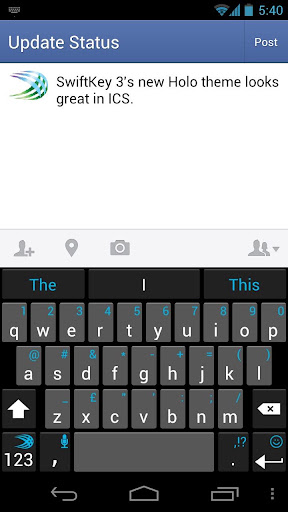
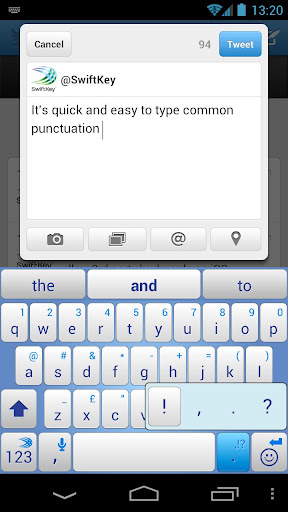
SwiftKey 3 understands how words work together, giving much more accurate corrections and predictions than other keyboards. Very sloppy typing will magically make sense, even if you miss spaces, and SwiftKey 3 also predicts your next words.

SwiftKey 3 learns the words and phrases you use, and how you interact with your keyboard as you use it, to make typing easier and even more accurate over time. You can also personalize it using your Gmail, Facebook, Twitter or blog posts.

SwiftKey is among Android's best selling apps for a reason -- it transforms your keyboard, making typing a breeze and saving you hassle every day.

LANGUAGES SUPPORTED: (enable up to three at once if you're multi-lingual)
  • English (US)
  • English (UK)
  • Afrikaans
  • Arabic
  • Basque
  • Bulgarian
  • Catalan
  • Croatian
  • Czech
  • Danish
  • Dutch
  • Estonian
  • French (CA)
  • French (FR)
  • Finnish
  • Galician
  • German
  • Greek
  • Hebrew
  • Hungarian
  • Icelandic
  • Indonesian
  • Italian
  • Kazakh
  • Korean
  • Latvian
  • Lithuanian
  • Norwegian
  • Persian (Farsi)
  • Polish
  • Portuguese (BR)
  • Portuguese (PT)
  • Romanian
  • Russian
  • Serbian
  • Spanish (ES)
  • Spanish (US)
  • Slovak
  • Slovenian
  • Swedish
  • Turkish
  • Ukrainian
Support for QWERTY, QWERTZ, QZERTY, AZERTY, DVORAK, COLEMAK, Arabic, Bulgarian, Greek, Hebrew, Korean, Persian (Farsi), Russian and Ukrainian layouts.

What's in this version : (Updated : Feb 20, 2013)
  • SwiftKey Flow: World’s most accurate gesture input, with next word prediction
  • Flow Through Space: Gesture multiple words without lifting a finger
  • Personalization: More thorough learning of your language and typing style
  • Better predictions: Enhanced language engine, predictions in more text fields
  • Easier corrections: Tap anywhere on a word to choose an alternative
  • 60 languages: Now including Albanian, Bosnian, Javanese, Sundanese, Thai, Vietnamese
Required Android O/S : 2.1+

Screenshots :


Download : 6.5Mb APK - Link 1